
CYCRANE / Intelligent Crane Control
Crane Control Systems & Drives.
Bring hoist, cross-travel and long-travel control into one coordinated package. Explore vector VFDs, radio and pendant controls, PLC interfaces and safety options — then build a preliminary specification for quotation.
- VFD / PLCDrives & automation
- Radio / PendantOperator control
- STO / SafetyConfigurable protection
 HOIST / CROSS TRAVEL / LONG TRAVEL / SAFETY
One control system. One coordinated RFQ.For new installations, upgrades and replacements.
- 01Choose motions
- 02Define control & safety
- 03Send your configuration
01 / Control options
Designed around how
your crane moves.
Choose the control functions needed for your lift. The configuration can combine drive control, operator interfaces, machine safety and monitoring in one enquiry.
VFD & Motion Control
Encoder or sensorless vector control for hoist, trolley and long-travel. Braking resistor or regenerative options, controlled ramp profiles and low-speed operation.
Select drive requirements ↗Remote & Pendant Controls
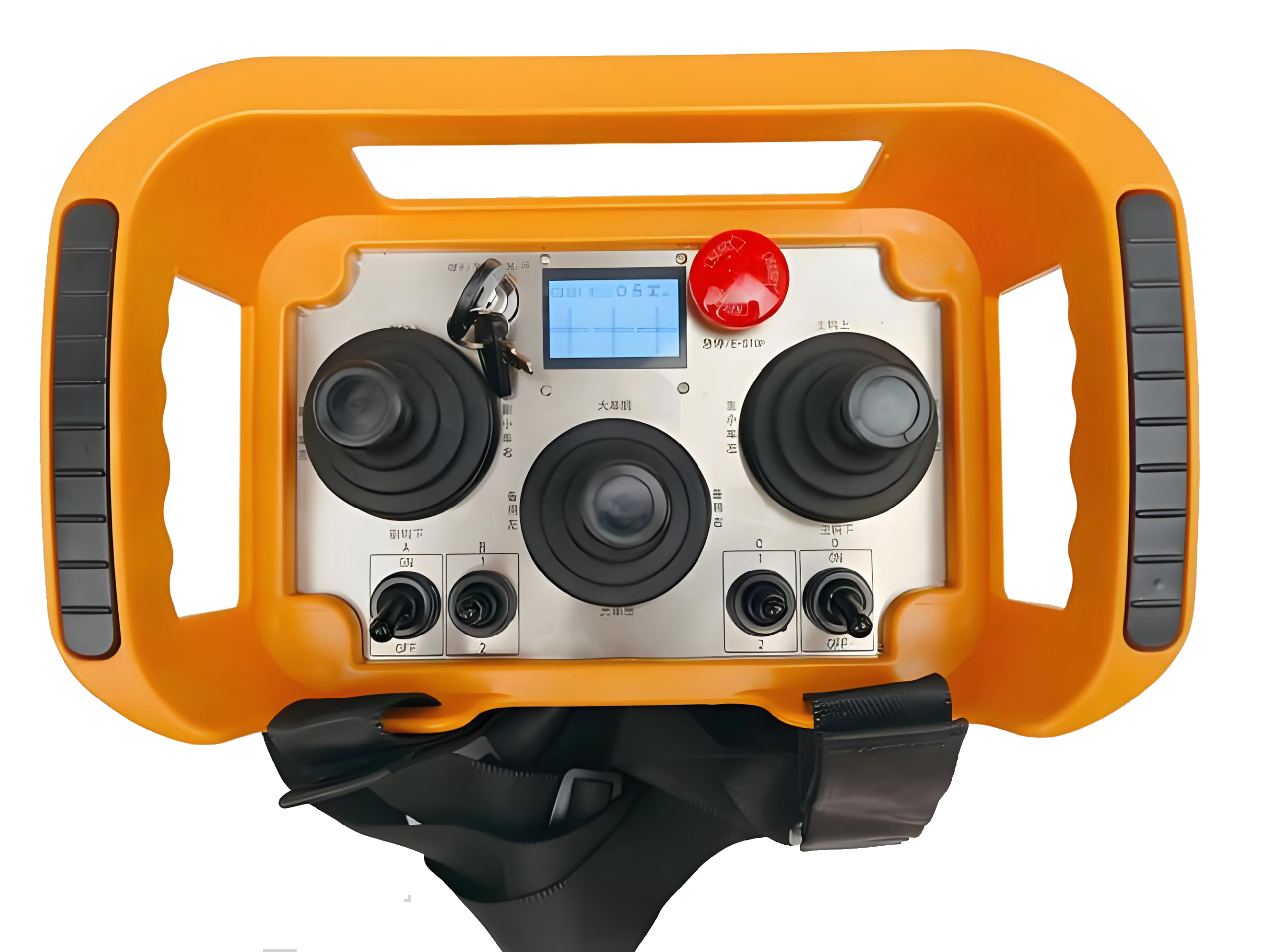
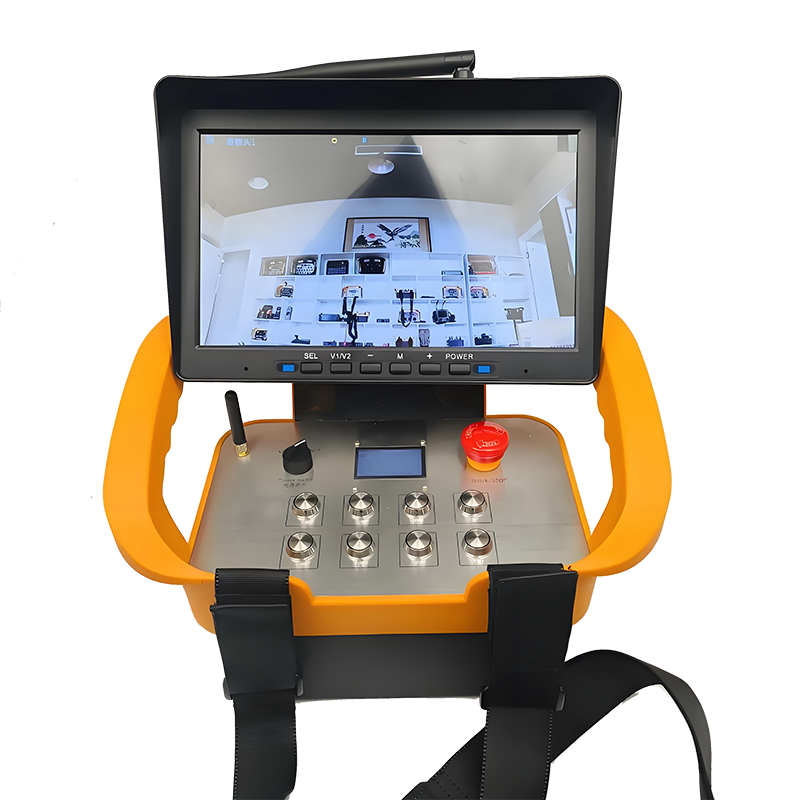
Radio transmitter configurations, pendant control stations and optional cabin consoles to suit operators and operating conditions.
Choose operator interface ↗Protection & Interlocks
Safety functions may include emergency stops, STO, overload limiting, limit monitoring and anti-collision measures, subject to system design.
Set safety functions ↗PLC, HMI & Diagnostics
Interface and diagnostics options for fault indication, I/O monitoring and communications such as Modbus, PROFINET or CANopen where specified.
Discuss PLC scope ↗02 / System integration
From motion requirements
to a workable controls package.
The initial enquiry collects engineering inputs. A technical proposal should then validate motor nameplates, operating duty, braking energy, safety functions and electrical coordination.
Define the axes
Specify hoist, cross-travel and long-travel motions, speeds, loads, motor ratings and required supply voltage.
Select the architecture
Choose the drive method, resistor or regeneration strategy, remote/pendant interfaces, enclosure and requested safety functions.
Review the package
Receive preliminary sizing outputs and an indicative budget, then forward the configuration and drawings for technical review.
03 / Interactive planning tool
Build your control
system specification.
The controls below reflect the parameters in your original builder. Estimates are indicative; selected motor and braking hardware must be checked against actual duty and manufacturer data.
Project requirements
Select motions and enter the main electrical and mechanical details.
01. General system
Select which motions will use this control package.
02. Hoist motion
Enter the actual motor rating if known; otherwise use load and lifting speed for a rough mechanical power calculation.
03. Trolley & long-travel
Use motor nameplate data where possible. Simple rolling-resistance formulas omit acceleration, duty and site conditions.
04. Drive & braking
Choose the preferred braking strategy and deceleration demand.
05. Safety & motion features
Select only the functions needed; a safety assessment is required to approve the actual implementation.
06. Operator interface
07. Installation & project
04 / Indicative commercial planning
See a rough budget,
then request firm pricing.
The estimate uses the illustrative unit-cost factors from the original page and updates with selected motions, power ratings, safety features, interfaces and quantity. It is not a verified CYCRANE selling price.
Indicative EXW total / USD
- Controlled motions
- —
- Drive & braking
- —
- Control interfaces
- —
- Enclosure / feed
- —
- System quantity
- —
- Timeline
- —
Illustrative planning range only. The original pricing assumptions have not been validated as current market or factory prices. Freight, taxes, installation, regulatory certification, and unmodelled engineering/materials are excluded. Motor sizing and protective hardware require engineering review.
05 / Applications & details
Control hardware
for the complete crane.
Control panel, drive and operator-interface examples from the original CYCRANE page. Exact configurations may vary by enquiry.

Designed for the duty — not just the motor kW.
For a valid quotation, supply motor nameplates, power supply, duty class, travel speed, required safety functions, enclosure conditions and any existing electrical drawings.
06 / Technical overview
Control specifications.
Reference control options from the original page. Confirm the final safety performance level and installed electrical ratings with the technical team.
| Drive methods | Encoder or sensorless vector VFD; two-speed control; soft starters. PLC and HMI functionality as required. |
|---|---|
| Operator interfaces | Pendant, radio control with transmitter quantity options, cabin console. |
| Safety options | STO, emergency stops, limit switches, overload limiting, collision avoidance; subject to project-specific safety design. |
| Power supply | 380–460 V, 50/60 Hz, three-phase. Main protective devices and auxiliary control power determined by design. |
| Enclosure | IP54 / IP55 / IP65 selection; construction and environmental options on request. |
| Communications | Modbus RTU/TCP, PROFINET, CANopen if specified and supported by chosen equipment. |
| Documents / testing | Wiring diagrams, I/O schedule, FAT documentation and manuals according to agreed scope. |
07 / Project workflow
From enquiry to commissioning.
- 01 / DEFINITION
Requirements
Motion data, motor nameplates, duty and supply conditions.
- 02 / PROPOSAL
Design review
Preliminary architecture, component scope and drawings.
- 03 / BUILD
Assembly
Panels, wiring and specified interface integration.
- 04 / TESTING
FAT
Agreed checks and functional verification before dispatch.
- 05 / DELIVERY
Commissioning
Installation guidance and site setup as arranged.
08 / Frequently asked questions
Planning your control upgrade?
Send existing electrical drawings and equipment nameplates where available for a more reliable proposal.
Can you match an existing crane’s motor and control arrangement?
Yes, provide motor nameplate ratings, wiring drawings, supply voltage, duty and interface requirements. Any replacement design needs a technical compatibility review.
Can I select radio remote and pendant control together?
The enquiry builder allows both options. Final interlocking, emergency stop functions and switch-over logic must be designed for the selected equipment and applicable safety requirements.
Are the displayed VFD and breaker sizes final?
No. These are basic planning figures, not approved equipment choices. Actual ratings depend on current, torque, thermal duty, overload, regenerative energy, coordination and fault-level data.
Does the estimate represent an official factory quotation?
No. It follows illustrative arithmetic from the original page only. A formal EXW/FOB offer is provided after technical and commercial confirmation.
What should I include in my RFQ?
Crane type, load and speeds, motors, duty, power supply, requested safety features, installation environment, quantity, preferred lead time and existing drawings if available.
09 / Commercial enquiry
Get your control
system quotation.
Your selected configuration appears in the brief. Provide your contact details and any drawings so we can check design feasibility, supply scope and lead time.
To receive a complete specification with each CF7 email, add the hidden field and corresponding Mail tag explained in the installation notes.
Send your technical RFQ.
Review the generated control package information and submit your enquiry through the existing website form.
Preparing your specification...
Form unavailable? Email info@cy-cranes.com or use the copy button to paste the exact configuration into your enquiry.